Please visit Marketing Land for the full article.


from Marketing Land - Internet Marketing News, Strategies & Tips https://ift.tt/3cWWYX6
via IFTTT


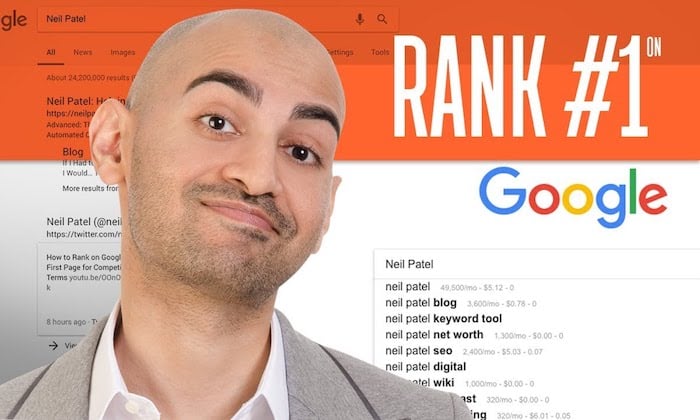
Today’s going to be fun.
I’m going to make a bet with you that if you follow the 3 steps below, and you really follow them, you can get 10,000 visitors from Google.
I promise it won’t be hard, but it will take time.
And if you follow my steps and don’t get the results, hit me up and I will personally help you with your marketing.
All I ask is you do it for 3 months straight. You may not get to 10,000 visitors from Google in 3 months as some niches are really tiny, but most of you should get there or be well on your way.
Again, if you prove to me that you followed everything below and you don’t achieve the results, you can get in touch and I will personally help you with your marketing for free.
Ready?
If you pick the wrong keywords, you’ll find yourself with little to no traffic and, even worse, you’ll find yourself with little to no sales.
So, before we get you on your way to more search traffic, let’s find you the right keywords.
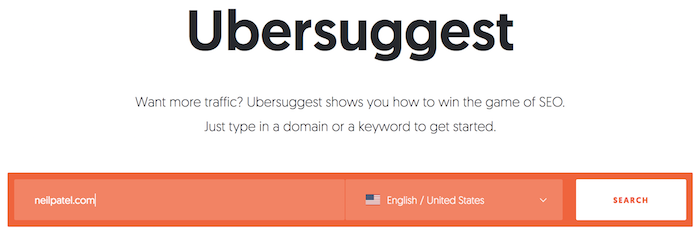
I want you to head to Ubersuggest and type in your competitor’s domain name.
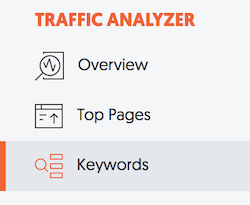
Now, I want you to click on the “Keywords” navigational option in the sidebar.
This report will show you all of the keywords that your competition is ranking for.
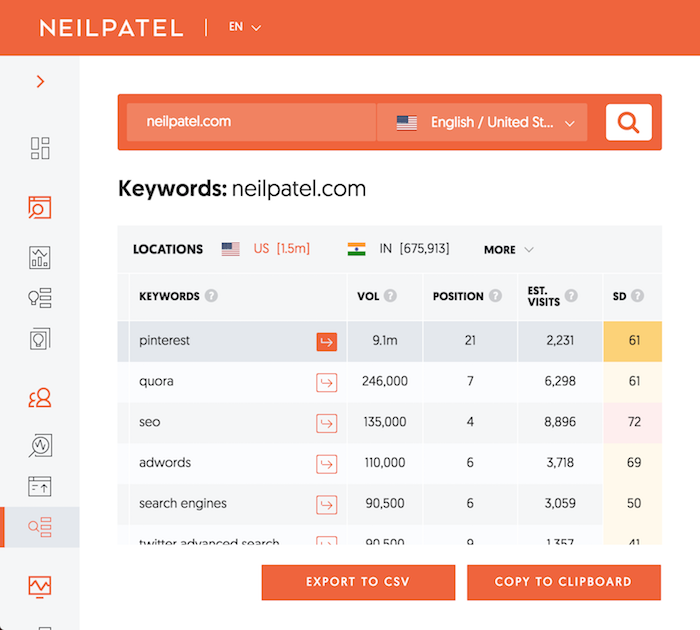
If you don’t see a list of thousands of keywords, that means you didn’t type in a big enough competitor. And if you don’t know who a big competitor is, just do a Google search for any major term related to your industry. The sites at the top are your major competitors.
I want you to go through the list of keywords and look for all of the keywords that are related to your business and have an SEO Difficulty (SD) score of 40 or less. The higher the number, the harder the keyword is to rank for. The lower the number, the easier it is to rank for.
In addition to an SD score of 40 or lower, I want you to look for keywords that have a volume of 500 or more.
Volume means the number of people that search for the keyword on a monthly basis. The higher the number, the more potential visitors that term will drive once you rank for it.
Next up, I want you to click on “Top Pages” in the navigation.
This will bring you to a report that looks like this:
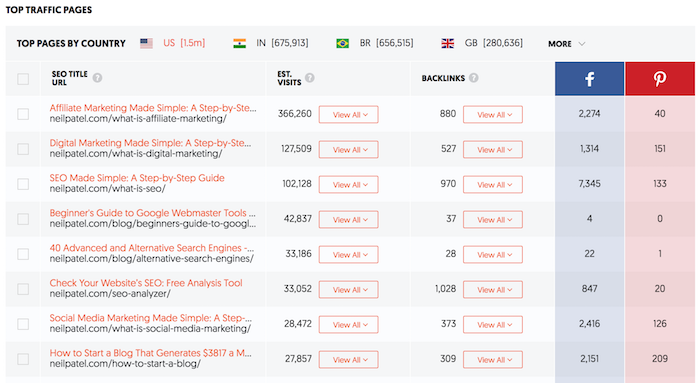
This report shows you the most popular pages on your competitor’s site.
Now, under the Est. Visits (Estimated Visits) column, I want you to click on “view all” for the first few results.
Every time you do that it shows you all of the keywords that drive traffic to that page.
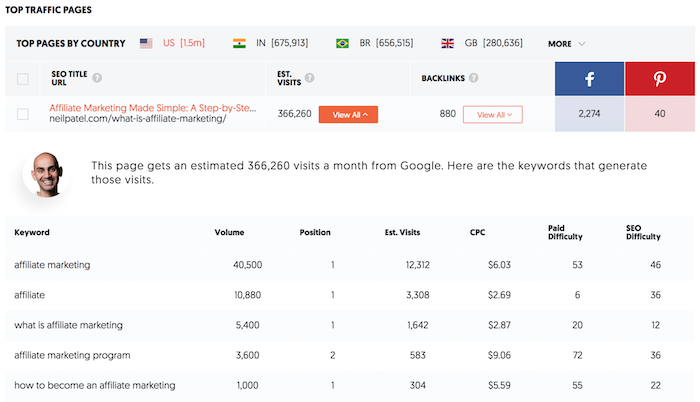
Just like you did with the keywords report, I want you to look at the keywords that have an SD of 40 or lower and a volume of 500 or more.
The one difference though, is that I want you to check out some of the URLs on the Top Pages report.
Click on over to the site so you can see the type of content they are writing. This is important because it will give you an idea of the types of content that Google likes to rank.
When you create similar pages (I will teach you how to do this shortly), it will allow you to get similar results to your competition over time.
Now that you have a handful of keywords, I want you to expand the list and find other related keywords.
In the navigation menu, click on “Keyword Ideas.”
When you type in one of the keywords you are thinking of going after in this report, it will give you a big list of other similar keywords.
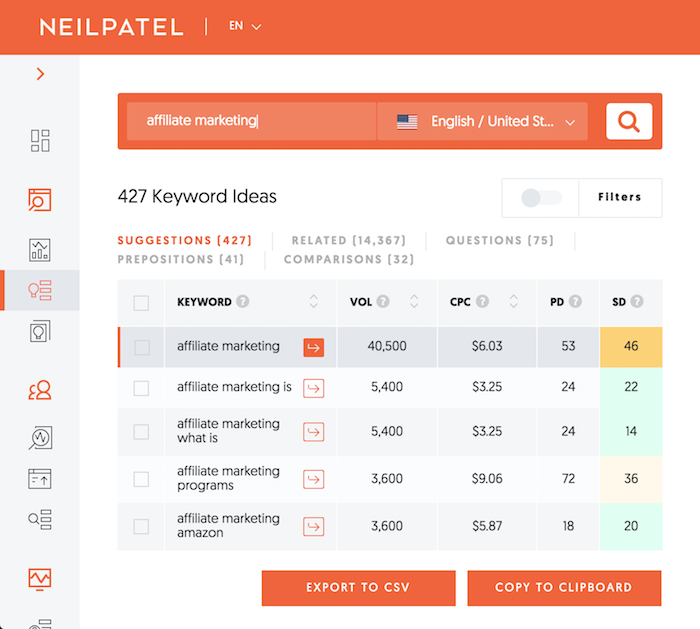
This is important because it will show you all of the closely related terms.
For example, let’s say you came up with a list of keywords of a handful of keywords, such as:
You can’t just take all of those keywords and write one article and shove all the keywords in because they aren’t similar to each other. Someone looking for “dog beds” is probably not interested in reading about what birds eat.
So by typing in a keyword into the Keyword Ideas report, it will show you all of the other similar keywords that you can include in a single article.
When you are on the Keyword Ideas report you’ll notice some tabs: Suggestions, Related, Questions, Prepositions, and Comparisons.
I want you to go through each of those tabs. They will show you a different group of similar keywords that you may be able to include in your article (we will go over how to write the article in step 2).
Just take a look at the Questions tab:
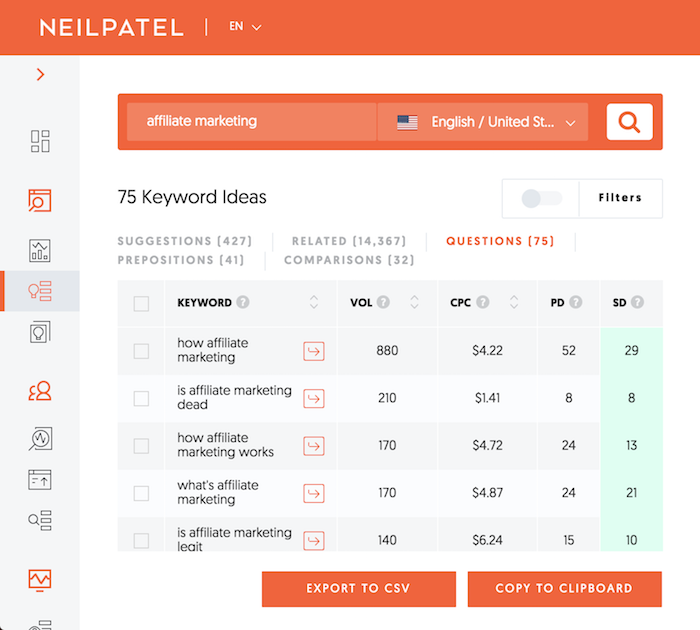
You can see the keywords are drastically different than the Related tab:
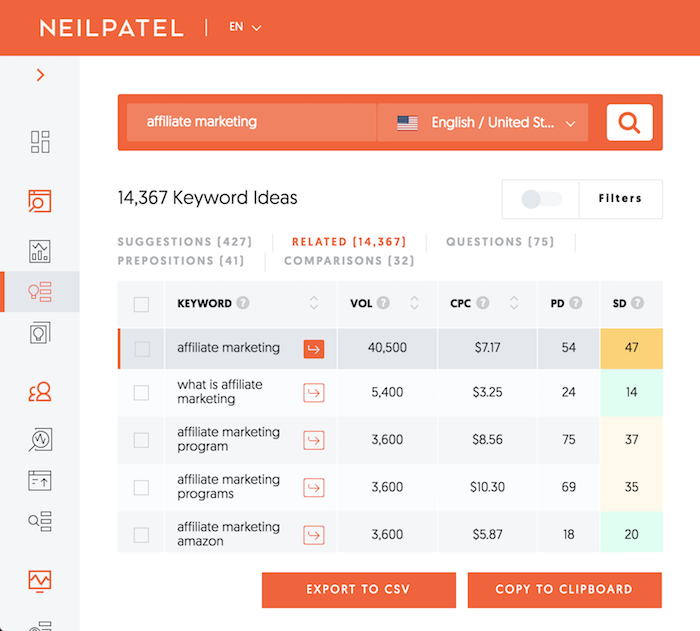
Again, you’ll want to look for all keywords that have an SD score of 40 or lower. But this report looks for keywords that have a volume above 200.
I know 200 may seem like a small number, but if you find 100 good keywords that all have a volume of 200 or more, that adds up to 20,000 potential visitors per month. Or better yet, 240,000 per year.
Now it’s rare that you are going to get all of those people to come to your site, but you can get a portion of them. Even 10% would add up… especially if you did this with a handful of articles.
Your goal should be to have a list of at least 100 keywords that are very similar. You’ll want to do this at least five times. For example, remember that list of five keywords I mentioned above wasn’t too similar to each other…
You’ll want to make sure that for each main keyword you use the Keyword Ideas report to find another 100 that can accompany each keyword.
At this point, you should have a list of keywords. If your list of keywords isn’t at least 100 keywords per group, go back to step 1 and keep at it.
It’s not that hard to get to 100 similar keywords that you can include in one article. It just takes some time to continually search and find them.
In general, as a rule of thumb, I can find 100 keywords in less than 8 minutes. It may take you a bit longer than me at first, but once you get the hang of it, it’ll be easy.
With your newly found keywords, I want you to write an article.
All you have to do is follow this tutorial step-by-step to write your first article.
Or, if you prefer a video tutorial, watch this:
As for your keywords, naturally place them into the article when it makes sense.
What you’ll quickly learn is that you probably won’t be able to “naturally” include all 100 keywords within your article. And that’s fine.
The last thing you want to do is stuff in keywords because you aren’t writing this article for just search engines, you are writing it for people… and the secondary benefit is that search engines will rank it because it contains the right keywords.
Before you make your article live on your site, I want you to keep a few things in mind:
There are a lot of other things you can do to optimize your articles for SEO, but my goal is to keep this simple. Again, if you just follow these three steps, you’ll hit the 10,000-visitor mark.
So, for now, let’s just keep things simple and once you hit your goal, then you can get into the advanced stuff.
Writing content is only half the battle. Even if you include the right keywords in your article, if you don’t promote, it’s unlikely that it would be read or rank on Google.
So how do you make sure your content is read and ranks well?
Well, first you need to get social shares, and second, you need to get backlinks.
Yes, search engines don’t necessarily rank pages higher when they get more Facebook shares or tweets, but the more eyeballs that see your page the more likely you are to get backlinks.
And the more backlinks you get, generally, the higher you will rank.
So here’s how you get social shares…
First, I want you to go to Twitter and search for keywords related to your article.
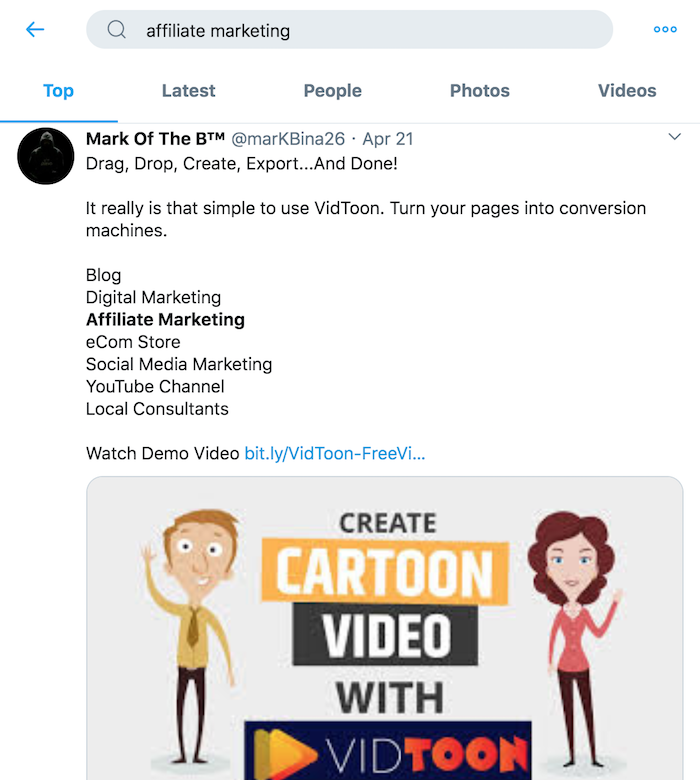
As you scroll down, you’ll see thousands of people tweeting about stuff related to your keywords. Some of them will just be general updates but look for the members sharing articles.
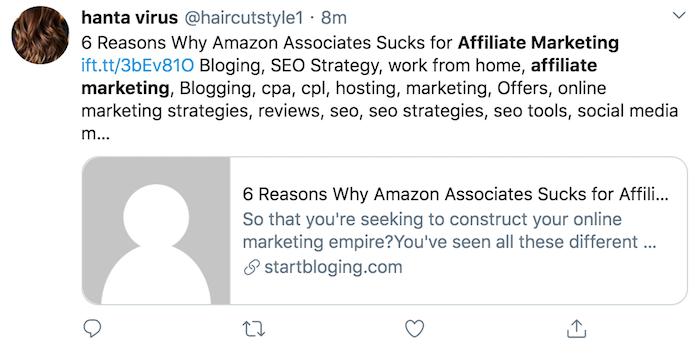
And…

Now what I want you to do is click on their profile and see if they mention their contact information or their website. If they mention their email you are good to go. If they mention their website, head to it, and try to find their contact information.
You won’t be able to find everyone’s contact information, but for the people you do, I want you to send them this email:
Subject: [insert the keyword you searched for on Twitter]
Hey [insert their first name],
I saw that you tweeted out [insert the title of the article they tweeted]. I actually have an article that I recently released on that subject.
But mine covers [talk about what your article covers and how it is unique].
[insert link to your article]
If you like it, feel free to share it.
Cheers,
[insert your name]
PS: Let me know if you want me to share anything for you on Twitter or any other social network.
What you’ll find is a large percentage of the people will be willing to share your content because they already are sharing related content and, of course, you offered to share their content, which helps out too.
If you send out 30 to 40 emails like this, you’ll start getting traction on the social web.
Now that you have social shares, it’s time to build backlinks. Instead of giving you tons of link building methods as there are many that work, I am just going to start you off with one that works very well.
I want you to head back to the Keyword Ideas report on Ubersuggest.
Once you get there, type in some of the keywords that you are trying to go after.
On the right side of the report, you’ll see a list of sites that rank and the number of backlinks that each of the ranking URLs has.
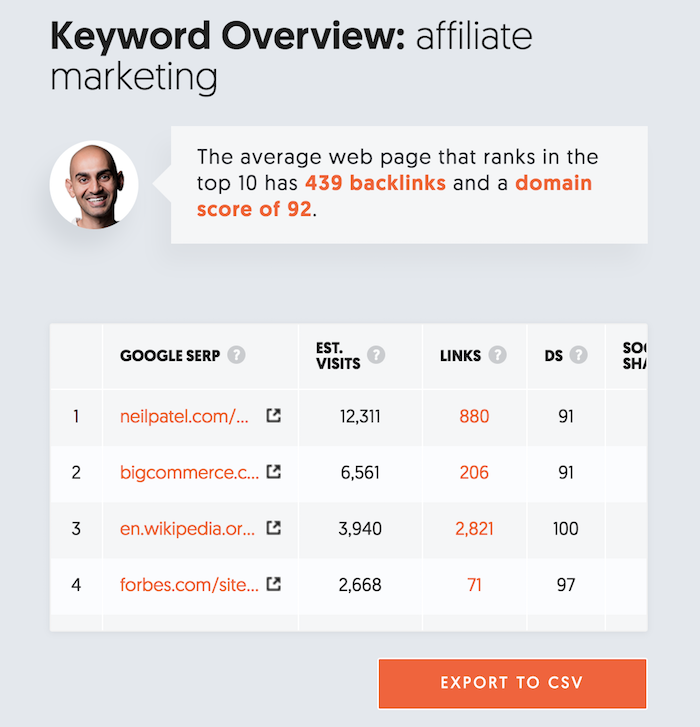
Click on the “Links” number. For each result, it will take you to the Backlinks report, which looks something like this:
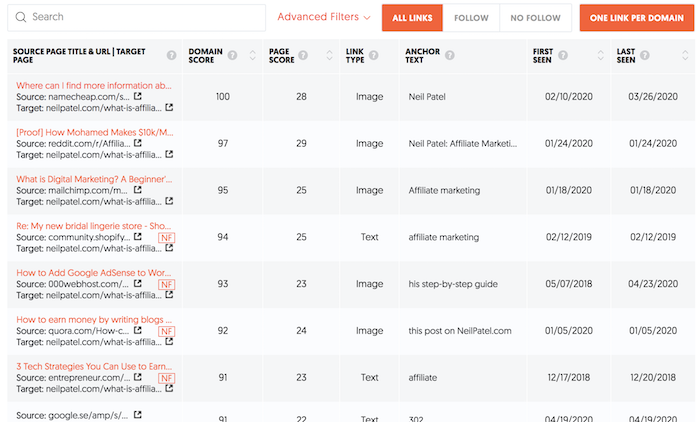
This will give you a list of all the sites linking to your competitor’s article.
I want you to go to each of those URLs, find the site owner’s contact information, and shoot them an email that looks like this:
Subject: [name of their website]
Hey [insert their name],
I noticed something off with your website.
You linked to [insert your competitor that they linked to] on this page [insert the page on their site that they are linking to them from].
Now you may not see anything wrong with that, but the article you linked to isn’t helping out your website readers that much because it doesn’t cover:
[insert a few bullet points on how your article is better and different]
You should check out [insert your article] because it will provide a better experience for your readers.
If you enjoyed it, feel free to link to it.
Cheers,
[insert your name]
PS: If I can ever do anything to help you out, please let me know.
I want you to send out 100 of those emails for each article you write.
Yes, it takes work to get 10,000 visitors but once you do it you’ll continually generate traffic and, more importantly, sales.
To achieve 10,000 visitors, I want you to do the steps above five times. In other words, you will be writing five pieces of new content following the steps above.
It’s actually not that bad because you can just do 1 a week. So, within 5 weeks you would have done your job.
So, are you going to accept the challenge? If you do everything and don’t see the results over time, you can hit me up and I’ll help.
The post 3 Simple Steps to Get Your First 10,000 Visitors from Google appeared first on Neil Patel.


How to Get High-Quality Backlinks written by Jenna Jantsch read more at Duct Tape Marketing
Getting backlinks can seem like a daunting task. How do you get other businesses to link to your site online?
If you don’t have any backlinks yet you can get up and running pretty quickly by tapping your existing partners and resources within your community. Things like the local chamber of commerce online listings, alumni directories for the founders’ schools, and church and community directories are great places to start. This is the low-hanging fruit, and getting these backlinks set up is a great way to ease into the next steps in a backlink strategy.
Once you’ve established those links, it’s time to move onto more advanced tactics. Gathering more backlinks should be an ongoing effort, and if you’re looking for legitimate ways to get backlinks, these are the best way to do it.
Start by investigating your competitors. Where are they getting backlinks? Are they in industry databases or local publications that list providers in their city? Once you’ve discovered these additional places where you can be listed, it’s sometimes as easy as filling out a simple form to get your business listed.
A comprehensive SEO tool like SEMrush or Ahrefs can help you research your existing backlinks as well as the links your competitors have acquired.
Hopefully, you already have some content on your site. Sometimes, there’s an opportunity to restructure or refresh the content you already have in order to generate backlinks.
Do you have any blog posts that list providers or tools that are helpful for your readers? Take a look through the list and add some new businesses onto these lists. Then, reach out to these businesses to let them know their service or tool has been featured; they’ll want to let their customers know that they got a shout-out on an outside site, and so you’ll likely get a backlink from them.
Guest blogging has long been a popular, more advanced way to get backlinks. Reaching out to relevant sites and writing a guest post on their blog is a great way to get links. However, over the years the trend of guest posting has waned a bit, so it’s now more difficult to get a guest blogging gig.
It’s worth the try, though! Put together a targeted list of blogs and publications that would be a solid fit for a strategic partner for your business. Write a compelling, error-free pitch email, outlining the topics you could write about and why it would bring real value to their audience. Tailor your pitch to each blog’s specific audience, and take the time to research who you’re emailing so that you can send a personalized message. Finally, feel free to follow up with your contact in a respectful way if you don’t hear back initially.
While guest blogging seems to be falling out of favor, guest podcasting is my new favorite way to get backlinks. Just like with guest blogging, guest podcasting is great because it allows you to tap into the existing audience of the brand of the podcast you’re appearing on.
And there’s an additional benefit that guest blogging doesn’t have: It’s very little additional work. While writing a blog post requires research, writing, editing, and selecting photos and relevant emails, when you are a guest on a podcast, you simply show up and talk about what you do every day. You’re an expert in your field, and you can speak comfortably on your topic with little preparation. And with most podcasts, you can call in from wherever you are to speak with the host, so within the 30 minutes or so that it takes to do the interview, you have generated great backlinks.
A service such as Podcast Bookers can get you set up a pitched to podcasts very quickly.
While it’s sometimes challenging to convince others to let you guest blog, if you have exclusive research to share, you can capture everyone’s attention. Offering up research is a great way to get media links and to even open guest blogging doors.
Yes, exclusive research takes time. However, if you are able to partner with one of your existing business relationships, you can both reap the benefits and halve the work. You and your strategic partner can tap into your networks to find people to interview for the research. Then divide and conquer when it comes to assembly the data and creating visually-appealing ways to share it.
How can you get attention and backlinks for new content you create? Mentioning relevant influencers, community members, or others in your posts is a great way to get re-shares on new content.
Of course, you shouldn’t just stuff names into posts for the sake of name dropping. Make sure that the people you’re mentioning are relevant to what you’re writing about. For example, let’s say you are a home remodeling business. Consider pulling together a series of posts featuring families you’ve done work for. If there’s anyone that’s a pillar of the community who they’ve worked with, ask if they’d be willing to be featured. Let’s say you helped the former mayor remodel her kitchen—ask her if she’d be willing to talk about the process and share how her new and improved kitchen has bettered her life.
Once the post goes live, let the person know and ask them to re-share with their network and followers.
With all of these new digital marketing tactics, it’s possible to forget about those tried-and-true methods. But press releases are still a great way to get attention and backlinks! Are you launching a new product or opening a new location? Did you make a big, announcement-worthy hire? Are you participating in a local community event? There are plenty of reasons you might write a press release.
If you need a refresher on how to write an effective press release, check out this guest post on our Duct Tape Marketing blog.
This is a long-game approach to getting backlinks, but it’s worth the effort. When you’re creating content, link out to tools and resources you genuinely like and think are helpful. If you’re featuring a specific tool or mentioning an individual person, you can email the business or person to let them know. But it’s good practice to include external links in every post, and many of those external links don’t warrant an email to the source.
However, it’s likely that the source is doing exactly what you’re doing: monitoring your online presence. They’ll see an alert that they’ve been linked out to, and that simple thing such as a link can get your brand on their radar screen. While they might not shout out that piece of content or link back to them right away, there may come a time in the future where they’re looking for a link to share that’s relevant to your client’s business, and it’s your site that they’ll turn to.
It’s important for you to build up a repository of backlinks. It matters for SEO ranking and your online reputation, and the more mentions you can get across the web, the more likely you are to win the attention of a new audience. But just as important as quantity is quality. A great marketing strategy can help you gather backlinks that are relevant to your business.

Everyone in B2B is talking about account-based marketing. And almost everyone is practicing it in some form — around 93% of organizations, according to SiriusDecisions. “Not many are killing it though,” says Kelvin Gee. “That's the problem. They start pilots ... then they re-launch and learn from the mistakes. That's just a natural maturation.” This is a fundamental process in digital marketing, of course: test, assess, optimize. But in the Break Free B2B series, our goal is to help you fast-forward it by learning from the mistakes, successes, and revelations of your innovating peers in the field. And as the Senior Director of Modern Marketing Business Transformation at Oracle*, Kelvin draws from a deep well of experience at one of the powerhouse brands in enterprise technology. Walking the walk is different from talking to talk, but it’s easy to see why companies across the spectrum are seeking to do both. “Companies do need to be more customer-centric, deliver a better customer experience, personalize the content, align with sales, and measure themselves differently,” he observes. “I call account-based a strategic glue that pulls all that stuff together.” In his conversation with TopRank Marketing’s Josh Nite, filmed in Arizona during B2B Marketing Exchange in February, Kelvin shares his perspectives on what it takes to actually make ABM work, and how Oracle empowers its people to thrive within this framework. It comes down to a fairly simple and repeatable model: standardize, evangelize, train, enable. [bctt tweet="“Standardize, Evangelize, Train, Enable,” @kgee’s model for implementing #ABM at scale in large organizations like @oracle. #BreakFreeB2B. — Kelvin Gee" username="toprank"] During an expansive 25-minute interview, Kelvin unpacks the inner workings of enterprise ABM, from getting buy-in to rethinking attribution to developing meaningful metrics and beyond.
The post Break Free B2B Series: Kelvin Gee on Winning with Enterprise ABM appeared first on Online Marketing Blog - TopRank®.

