Thursday, April 28, 2022
Wednesday, April 27, 2022
How to Remove Personal Information From Google
Want to just get started? Click here to sign up for WebiMax and start removing personal information from Google today.
I’m sure you’ve heard it all before—once on the internet, always on the internet. But this saying doesn’t have to be true.
The internet can be a daunting place, and although information is timeless, it can also spread like wildfire. Sometimes personal information can make its way onto the web without your consent or by complete accident—and let’s be real here, there are many reasons why people want information removed from the depths of Google.
If this is the case for you, here are five steps to help you remove personal information from Google for good.
The Top Online Reputation Management Companies to Remove Personal Information From Google
If you need help with removing personal information from Google and want to learn how to do this effectively and on a friendly budget, here are the best options:
- WebiMax — Best for small businesses that need a hands-on solution
- NetReputation – Best for ultra-responsive customer support
- InternetReputation.com – Best for personal reputation management
- Reputation Defense Network — Best for permanently removing false content
- Podium — Best for getting reviews automatically
- SEO Image — Best for legal and medical practices
- Gadook — Best for rebranding after reputation attacks
- BirdEye — Best for getting Google and Facebook reviews
- Reputation.com — Best for knowing your competition’s reputation
- Go Fish Digital — Best for improving Yelp reviews
- Netmark.com — Best for hands-off, fast responses to reputation hits
You can read our full reviews of each online reputation management company here.
5 Steps To Remove Personal Information From Google
Removing personal information from Google won’t always involve deleting content from the pages you own. Here are five crucial steps to help you remove this information as efficiently as possible:
- Start with a quick Google search
- Delete information from pages you control
- Contact webmasters from sites you don’t control
- Contact Google
- Delete information from collection sites
The Easy Parts of Removing Personal Information From Google
Contrary to popular belief, removing many forms of personal information from Google is possible and easy. Whether you want to avoid identity theft, get rid of problematic blog posts, or shut down misinformation, an online reputation management company can help you do just that.
WebiMax is a leading digital marketing agency specializing in reputation management for small businesses. After a free reputation analysis, you will receive a report that lists all the negative online content about you or your company.
WebiMax gives you the option to either delete this content altogether or suppress the harmful search results instead, as Google is sensitive to certain types of content, such as anything involving the law.
Another easy part of this process is removing your own content from Google. If there is any information you’ve put on the internet yourself, it is quick and easy to remove if you still have access.
The Difficult Parts of Removing Personal Information From Google
When it comes to removing personal information from Google, the potential difficulty depends on what kind of information you want removed and from what pages. If you want to remove content from another person’s page, getting in contact with that person can often be time-consuming, and there’s no guarantee that you will hear back from them—or that they’ll be open to removing the content if you do.
It can also be challenging to remove content for legal reasons because there are different processes and regulations you have to abide by to have content removed from Google.
Step 1: Start With a Quick Google Search
Before attempting to remove any personal information from Google, you will need to know what’s out there first. The easiest way to do this is to start with a quick Google search of either your name or business name.
Turn On Incognito Mode
Before you begin searching, you should put your browser in incognito mode to prevent some tracking and auto-filling from your previous internet usage. Here are quick shortcuts for going incognito mode on both Mac and Windows.
- Incognito mode for Mac: Press Ctrl + Command + N
- Icognito mode for Windows, Linux, or Chrome OS: Press Ctrl + Shift + N
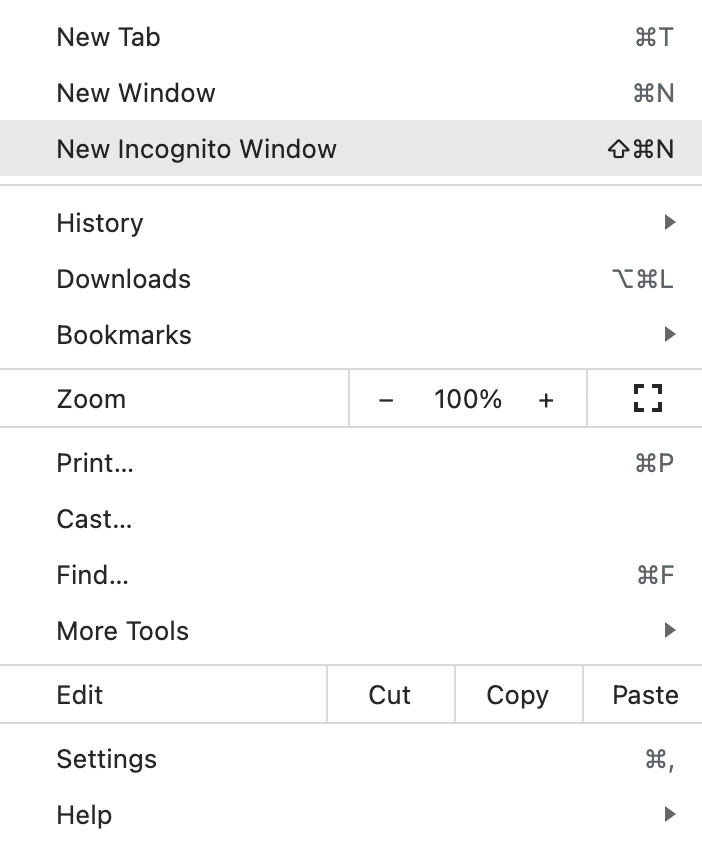
Alternatively, you can open Google Chrome on Mac or Windows and click the three vertical dots in the top right-hand corner of the screen and click New Incognito Window instead.
Search Google and Google Images
Once you look through Google’s search results, don’t forget to look at Google Images as well. Google Images can store different information and data and can often help you find more content you wish to remove in an easier way than looking through pages of links.
Depending on what you want to remove, it’s best to look through at least the first three pages of Google search results and images to understand how much content there is.
Step 2: Delete Information From Web Pages You Control
Firstly, you can remove personal information from Google by removing it from all the web pages you have control over. Here are three of the most common web page categories and how to go about removing information from these pages:
Social Media
Social media accounts are one of the easiest ways for information to spread online, making it difficult to remove every little aspect of data—especially if the information you want to remove has gone viral.
If you are active on platforms like Facebook, Instagram, Twitter, Pinterest, or Snapchat, it’s better to deactivate these accounts entirely, depending on how much you want to remove. It can be time-consuming to remove every Facebook status or picture on your Instagram feed, although it is doable.
On the other hand, if deactivation isn’t on the table for you, you can always make your social media accounts private and remove any sensitive information instead. For example, on Facebook, you can adjust your privacy settings to prevent Google from linking to your profile, here’s how:
- Click the down-facing arrow in the top right of Facebook
- Select Settings & Privacy, then click Settings
- In the left column, click Privacy
- Click Edit next to Do you want search engines outside of Facebook to link to your profile?
- Review your current settings and decide on the settings you want.
Website Domains
If you own a professional website, this counts as a website domain and is a separate entity with its own data and information. If you operate a website, the easiest way to remove any personal information is to log in and delete the content you want to.
If you don’t have access to the backend of your website anymore, you can contact your domain admin for access. If you ask an admin to grant you access, you may need to provide personal information to prove your identity.
Blogs
Whether you operate a blog on WordPress, HubSpot, Blogger, Weebly, Wix, or another blog site—you will be able to log in and remove any information you own. Again, if you don’t have access to these, you can always contact admin support for help.
If you operate a blog with more than one person, it’s imperative to let all parties know what information you will be removing. Getting consent from all parties to remove content ensures that no one will reupload this content again.
Step 3: Contact Webmasters From Sites You Don’t Control
Because Google gathers information, content, and data from across the internet, there will be times when the information you wish to remove will be behind a web page you don’t own. In these situations, contact the webmaster and ask them to remove the information.
Contacting the site owner is the only viable way to remove this content. Even if Google deletes the site or image from its search results, it’s still visible through a URL, social media sharing, or other search engines like Bing or Yahoo.
There are three ways to contact the webmaster to remove content:
Find the “Contact Us” Link
Most websites will have a ‘contact us’ link somewhere on the homepage. Alternatively, there will be an email address you can contact. It doesn’t matter which way you contact them, but finding this information on their website is an easy way to reach out first.
Find Contact Information Using Whois
If the webmaster you are trying to get in contact with doesn’t have any contact information on their website, you can opt to search within the Whois database. Every domain name has a Whois listing, and without domain privacy or Whois privacy protection, this listing information is available to the public and includes the owner’s name, email address, and phone number.
Here’s how to find contact information using Whois and Google search:
- Go to Google.com
- Search Whois and the website domain name
Alternatively, you can search for the domain name on the Whois website via its Domain Lookup feature.
Contact the Sites Hosting Company
If all else fails and you can’t retrieve the contact information from either Whois or the owner’s homepage, you can always attempt to contact the site hosting company.
Whois also provides the hosting information, but contacting them should be a last resort. Contacting the site hosting company may be time-consuming and involve additional information.
Step 4: Contact Google
The good news is that if you still can’t get in contact with the webmaster or are locked out of your website, you can contact Google, and it will remove personal information for you. However, there are specific types of content that Google will remove, and you will have to prove that the information creates a significant risk for identity theft, financial fraud, or other harm.
Here is what to expect when contacting Google for content removal:
Types of Removals Available
First, you will need to know the types of removals that are available. Here is a list of the current types of content that Google will remove from its search results:
- Non-consensual or explicit images
- Involuntary fake explicit content
- Content about you on sites with exploitative removal practices
- Personally identifiable information (PII) or doxxing content
- Images of minors
- Irrelevant explicit content from Google search results with your name
Each category requires slightly different information for you to submit a removal request. However, the most common requirements you will need are your name, the URLs, websites, or imagery associated with the content.
Outdated Content
On the other hand, you can also request that Google remove outdated content that was shared or published on other websites you don’t have access to. You can do so by using its free Outdated Content Tool.
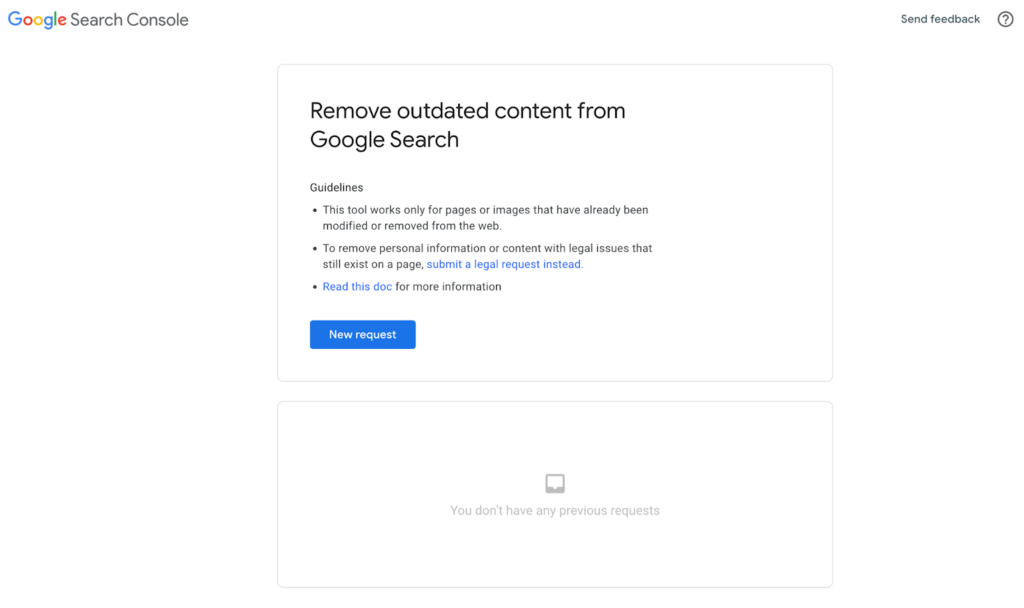
However, this is strictly for outdated info. You shouldn’t use this tool if:
- You think the information on the page or image is wrong, bad, or illegal
- You are a verified owner of the page
- You want to permanently remove a search result for a URL that is publicly accessible
- You want Google to recrawl a page
- The information is still on the live page
Removing Content For Legal Reasons
Legal disputes happen, and if you wish to remove information for legal purposes, you can also do this by requesting a removal through Google. Legal requests are more sensitive than other requests, so it’s crucial that you make sure you have the right information.
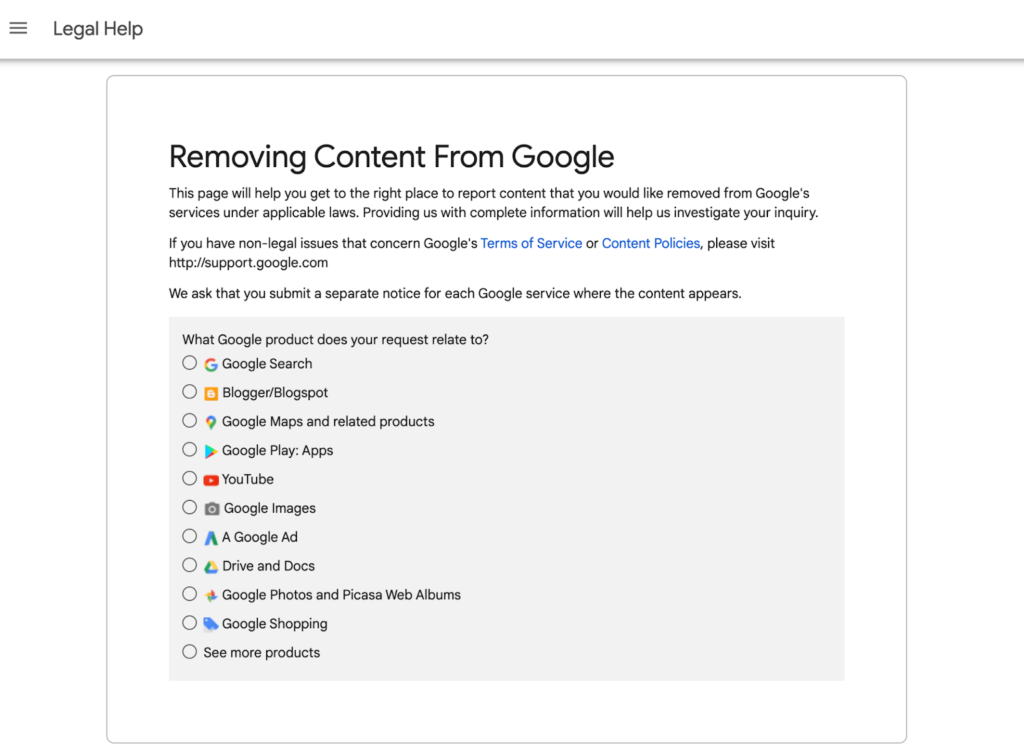
You can request the removal of content that includes malware, phishing, intellectual property use, defamation, court order, or abusive/explicit material.
Step 5: Delete Information From Collection Sites
Finally, you should seek out data collection sites and request that they remove any information you don’t currently want available online. But be warned: this process is highly tedious, and sometimes it isn’t always possible to remove every piece of data that exists online.
Google Data Collection Sites
To make it easier for yourself, you can find these data collection companies by Googling them and manually asking them to remove your data from their listings.
Opt-Out
This process will usually require you to find each data collection service online, scroll to the bottom of their website, and find the ‘opt-out’ form.
From there, you can choose which segments you want to opt out from, such as mailing addresses, phone numbers, and email addresses. However, these forms usually take between one to two weeks to process after submission, so it’s not only time-consuming but lengthy as well.


from Quick Sprout https://ift.tt/KGrxlBo
via IFTTT

Monday, April 25, 2022
Best Online Reputation Monitoring Tools
Want to jump straight to the answer? The best online reputation monitoring tool for most people is WebiMax or Mention.
Manually tracking what people are saying about your business online is unrealistic at scale. There are just too many platforms, websites, media outlets, and social channels to monitor in real-time.
Online reputation monitoring tools gather brand mentions, reviews, and customer sentiment from multiple sources so you can see everything in a single dashboard and get real-time alerts.
The Top 6 Best Online Reputation Monitoring Tools
- WebiMax— Best for monitoring and managing customer reviews
- Mention — Best for holistic brand monitoring
- SentiOne — Best for social media listening
- InternetReputation.com — Best for monitoring your personal reputation online
- Reputology — Best for multi-location businesses
- Meltwater — Best for media monitoring and PR
After extensive research and testing, we narrowed down the top six online reputation management tools that we can recommend with confidence. The reviews below will help you find the best option for your business and goals.
#1 – WebiMax — Best For Monitoring and Managing Customer Reviews

- Review collection dashboard
- Delete negative reviews
- Repair brand image
- Expert guidance and assistance


WebiMax is more than just an online reputation monitoring tool. They’re a full-service reputation management company. For more than a decade, they’ve been helping businesses build, maintain, and repair brand images across multiple industries.
One of my favorite parts of WebiMax is the review collection dashboard. This is the easiest way to monitor all of your customer reviews from every platform in a single source of information.
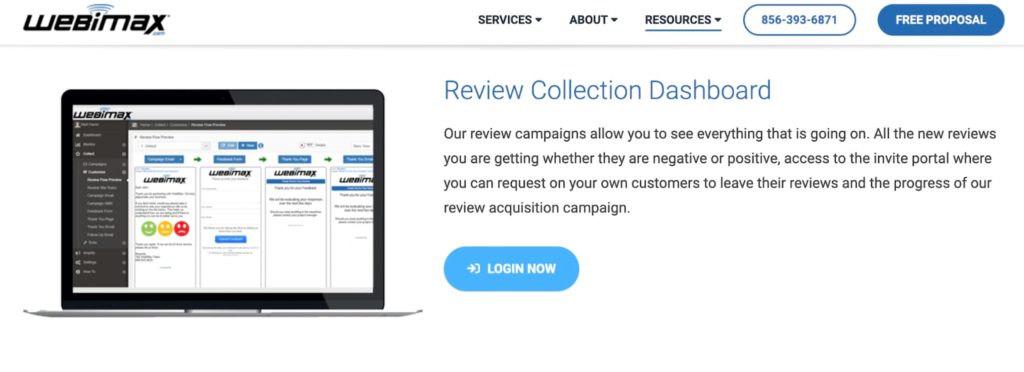
WebiMax’s client portal also offers dashboards for social monitoring, local listings, and campaign reporting.
What really makes this company stand out from the crowd is its other services that go beyond dashboards and reporting. WebiMax’s reputation management services include claiming unclaimed business profiles, promoting positive content, and deleting negative content.
After consulting with the reputation management experts at WebiMax, you’ll receive a realistic timeframe with actionable steps to achieve your business goals. That’s one of the many reasons why WebiMax boasts a 97% client retention rate.
This is an excellent option for any business that wants to take control of their reviews and eliminate negative content on the web.
To get started, fill out a form to request your free quote and proposal.
#2 – Mention — Best For Holistic Brand Monitoring

- Social media monitoring
- Customer review monitoring
- News, forum, and blog monitoring
- Competitive analysis
With more than 750,000+ marketers using this platform, Mention is one of the most popular online reputation monitoring tools on the web.
What makes Mention unique is its versatility. Unlike other tools on the market that just focus on one or two platforms, Mention monitors more than a billion sources on the web each day.

As a result, you’ll get reports and alerts across social media platforms, review websites, online forums, blogs, news outlets, and more. With Mention, you can easily make sense of complex data by filtering and analyzing your reports based on your goals.
This tool even supports online media monitoring and competitive analysis, which isn’t something you’ll see from many other solutions in this category.
From solo entrepreneurs to small businesses and large companies, Mention has a plan for everyone. Here’s a quick overview of the packages and pricing:
- Solo — $29 per month. Includes two alerts, 5,000 mentions, and five social accounts for a single user.
- Pro — $99 per month. Includes five alerts, 10,000 mentions, and ten social accounts for unlimited users.
- ProPlus — $199 per month. Includes seven alerts, standard alerts, 20,000 mentions, and 15 social accounts.
- Company — Custom pricing. Includes advanced alerts, 100,000+ mentions, unlimited social accounts, and every monitored network.
Try any Mention for free with a 14-day trial—no credit card required.
#3 – SentiOne — Best For Social Media Listening

- Identify social influencers
- Unlimited keywords
- Real-time alerts
- Historical data access
SentiOne offers one of the most advanced social media listening solutions on the market today. For organizations with a large social presence across multiple platforms, this tool should definitely be high on your radar.
Rather than just listing social mentions, SentiOne provides unique insights to help you learn how your brand is perceived online. This allows you to make actionable marketing decisions and identify the needs of your audience.
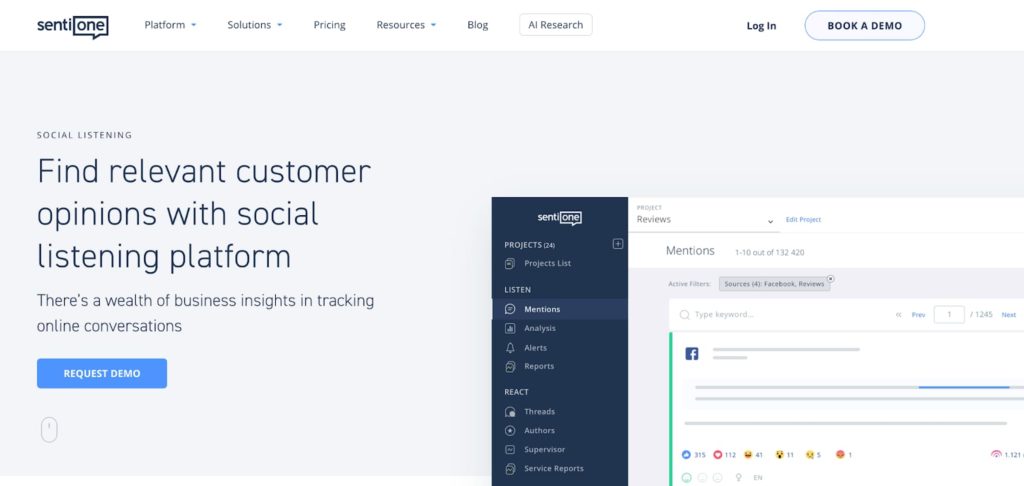
You can also use SentiOne to identify potential influencer partners, gain information on your competitors, get in-depth audience insights, and discover emerging trends in the market.
SentiOne supports unlimited keywords segmented by brand, campaign, purchase intent phrase, and more. So you’re only getting data that’s actually relevant to your goals.
The platform uses AI technology to help you avoid potential social media disasters with anomaly detection and real-time alerts.
SentiOne’s social listening and analytics plan starts at $299 per month. This package supports up to five projects, five users, and 12 months of historical data. There’s also an enterprise plan with unlimited everything and 36 months of historical data.
There’s no “official” free trial offered. But SentiOne says you can reach out to them if you want to test it out, and they’ll set up an account for you.
#4 – InternetReputation.com — Best For Monitoring Your Personal Reputation Online

- Content removal and suppression
- DIY reputation dashboard
- Reputation repair
- Hide personal info online
InternetReputation.com is a bit unique compared to the other tools on our list. While it can definitely be used by businesses, this solution is much better suited for individuals that want to focus on personal branding.
Whether you want to monitor, protect, improve, or repair your personal reputation online, InternetReputation.com has you covered.

This is a great option for people who want to clean up their personal image before applying for a job. It’s also a great solution for entrepreneurs and business owners who might get Googled by potential customers.
Your journey with InternetReputation.com starts with a reputation analysis. This will give you a better understanding of your current online reputation and how you can manage it.
InternetReputation.com has a DIY reputation dashboard that lets you consolidate, manage, and monitor everything from a single location.
They also offer a wide range of services for things like online public relations, mugshot removal, review removal, content removal, and more. So if there are negative articles or stories about you published online, InternetReputation.com can help you eliminate or suppress them. They’ll even help you remove any personal information from public listings.
Sign up for a free consultation to get started.
#5 – Reputology — Best For Multi-Location Businesses

- Manage reviews at scale
- Reporting for each location
- Custom alerts
- Automated feedback collection
Reputology makes it easy for multi-location organizations and chains to monitor their reviews and reputation at scale. It’s trusted by healthcare companies, hotel chains, auto groups, property management companies, and more.
Well-established brand names like Ashley Homestore and Gold’s Gym with hundreds of locations throughout the US rely on Reputology for reputation monitoring.
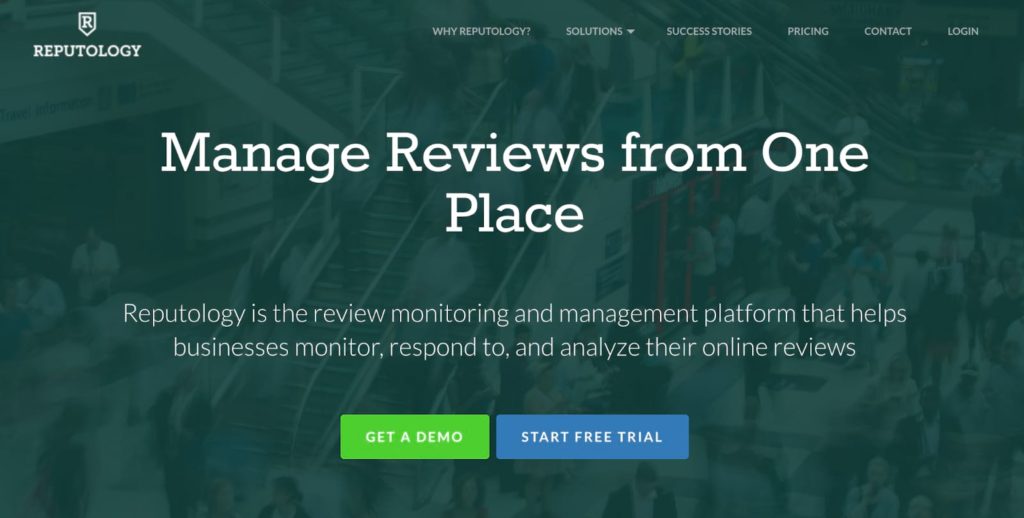
Organizations use Reputology’s solutions for removing negative reviews, responding to customer reviews, and improving star ratings on review sites. They specialize in review management at scale, which is crucial for multi-location businesses.
Reputology offers a single dashboard to monitor local directories for all of your locations. They also provide custom email alerts, automated feedback collection, and analytics by regional and storefront levels.
Here’s a quick overview of the Reputology plans and pricing:
- Single Location — $29-$49 per month. Includes daily review monitoring, email alerts, and reporting.
- Multi-Location — $10-$49 per month per location. Includes custom alerts, unlimited users, NPS module, and a dedicated account manager.
- Agencies — $10-$49 per month per location. Includes a branded white-label platform, SSO, and client management center.
Request a demo and free trial to get started.
#6 – Meltwater — Best For Media Monitoring and PR
- Monitor global news sources
- TV, radio, and podcast monitoring
- Competitor benchmarking
- Print media monitoring
Meltwater has been providing media relations and brand management solutions for more than 20+ years. They’re trusted by 27,000+ customers in 125 countries worldwide.
What’s unique about Meltwater is media monitoring services, which isn’t always something you’ll see from other solutions in this category.

They offer options for TV and radio monitoring, print media monitoring, podcast monitoring, and social media monitoring. Meltwater scans over 270,000+ news sources across the globe.
Meltwater provides businesses with a comprehensive media analysis with a heavy focus on PR and communications. You can use this information to create shareable dashboards for stakeholders, benchmark your performance against competitors, and create custom scoring capabilities based on your goals.
Use Meltwater to monitor unlimited keywords, get real-time alerts, and consolidate all of your media monitoring into a single platform. You can even use Meltwater as a way to monitor trends in your industry to better serve your audience’s needs.
Request a demo to get started.
How to Find the Best Online Reputation Monitoring Tools For You
All online reputation monitoring tools offer the same core function. They scan the web, find out what’s being said about your brand, and provide the results.
But that doesn’t mean each tool is interchangeable or created equally. The best online reputation monitoring solution for your business should be based on your goals, business size, and other unique factors.
Use the criteria below to help you narrow down your options. This will make it much easier for you to make an educated and informed buying decision.
Sources and Platforms Monitored
The first thing you need to find out is where the tool is pulling information from. Some tools strictly scan social media platforms. Others specialize in web monitoring, customer reviews, and public relations.
Small and local businesses tend to prioritize tools for customer reviews, as this has the largest impact on your reputation in local markets. Larger companies, chains, and multi-location businesses usually lean towards tools with a more holistic view from multiple sources.
Some tools on our list offer different packages and pricing tiers if you want to add on additional sources. So you can start with social media, and always upgrade your plan to monitor media sources like news outlets, forums, and blogs.
Simplified Reporting
Gathering brand mentions is just one small aspect of online reputation monitoring. The best tools put that information into easily digestible reports.
All of that information is useless if you can’t make sense of it. A long list of every tweet or Facebook post that mentions your brand doesn’t really give you any actionable sense of what you should be doing.
Try to get a free analysis or demo from any tool you’re considering. While these freebies won’t always be the most insightful, they should give you a good understanding of what your reporting will look like if you sign up for a paid service.
Online Reputation Management Services
Many online reputation monitoring tools just provide you with information. But it’s on you to take the next step.
A handful of software providers also offer online reputation management services. These go above and beyond the reports—offering actionable resources to improve your online reputation.
For example, some solutions help you get more reviews or remove negative reviews. Others can help you find and claim any unclaimed business profiles on the web.
These are the types of services you should be looking for if you want to take your online reputation monitoring to the next level. You can pass certain tasks off to the experts and let them handle everything on your behalf.
Alerts and Historical Data
Alerts can be a great way to timely respond to brand mentions. But depending on the size of your organization, some alerting tools can be a nuisance. So you want to make sure that these are fully customizable based on your needs and goals.
Take a company like Apple as an example. Imagine if someone in that organization got an alert every time the word “Apple” was mentioned on the web. That type of alert would do more harm than good.
But if you can set up those alerts to something more specific, like negative reviews on Yelp and Google, then it’s easier to manage and act appropriately.
In addition to real-time alerts, historical data about your brand monitoring can be really useful. You can use historical data to see customer sentiment related to certain promotions or campaigns you ran over time. Then you can determine whether or not to run similar ones moving forward.
Building vs. Repairing vs. Maintaining Online Reputation
Why are you looking for online reputation monitoring services?
Most of us either want to build, repair, or maintain online reputations. Each of these answers usually dictates a different tool.
Maintenance typically just requires weekly or monthly reports. But brand building and reputation repair both require a bit more hands-on work. These are both prime examples of when you’d want a tool that offers customizable real-time alerts.
Newer companies that need to build a strong reputation would likely need a service that helps them get more reviews and promote positive reviews. While a brand or individual that wants to repair an online image would need assistance removing negative content and other information from the web.
The Top Online Reputation Monitoring Tools in Summary
The best online reputation monitoring tools make it easy for businesses to track brand mentions and monitor reviews. Some solutions offer premium services for content deletion, PR management, custom alerts, and more.
WebiMax and Mention are the best options for most people. But whether you want to maintain your existing reputation, repair a damaged reputation, or build your brand image from scratch, the tools in this guide have you covered.
from Quick Sprout https://ift.tt/dSLFo9Q
via IFTTT
Compare The Best Cloud Web Hosting Plans
Want to jump straight to the answer? The best cloud hosting company for most people is Hostinger or Scala Hosting.
Cloud web hosting may be exactly what your business needs. Your data is spread across a network of servers, a cloud environment, instead of a single server.
This guide explains what cloud hosting is, how it works, and reviews the best cloud web hosting providers on the market today.
Best Cloud Hosting Services for 2022
- Hostinger – Most bang for your buck
- Scala Hosting – Best cloud hosting for custom resource allocation
- Cloudways – Best customizable managed cloud hosting
- HostGator– Best cheap cloud web hosting
- Nexcess – Best cloud hosting for ecommerce sites
- DreamHost– Best cloud hosting for developers
- SiteGround – Best cloud hosting for scaling resources
- A2 Hosting – Fastest cloud web hosting
- InMotion – Best cloud hosting for small businesses
Read on for detailed reviews of each service so you can start comparing features and pricing.
Cloud hosting works a little differently than other popular types of hosting, such as shared hosting, VPS (virtual private server) hosting, or dedicated server hosting.
Each host also does things a little differently as well. After the reviews is a short guide that will help you assess each cloud hosting option.
Hostinger — Most Bang for Your Buck

- Normally $29/month
- Month-to-month pricing
- Free domain and SSL certificate
- 30-day money back guarantee
Hostinger offers quality web hosting at competitively low prices. Their most affordable cloud web hosting plan is currently $9.99 per month.
You’ll have to sign a contract to get this deal, but it’ll let you host up to 300 websites for less than 10 bucks a month.
It’s one of the lowest prices for cloud web hosting out there. Couple that with their 99.9% uptime guarantee and decently fast speeds, and you have yourself an excellent host.
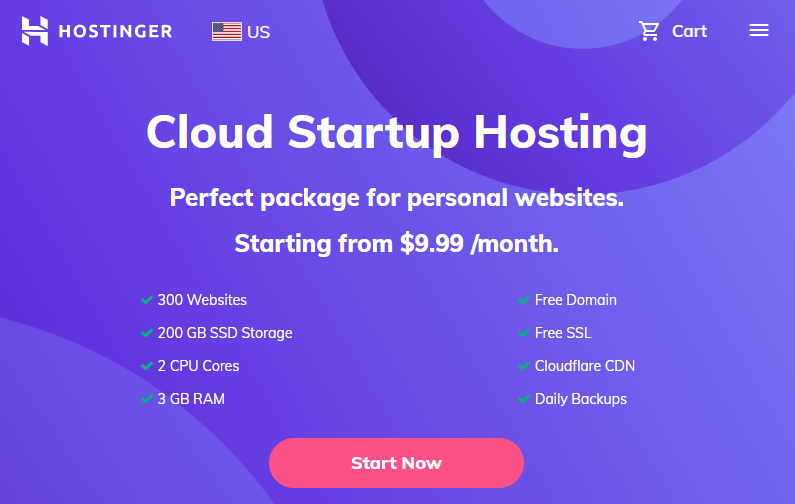
These are fully managed plans with 24/7 support. You might think that the low price would mean no customer service, but Hostinger takes care of and the server uptime, monitoring, and automated daily backups.
One thing that really sets Hostinger out from the rest of the pack is their dedicated IP. Customers receive free dedicated IP with any of their cloud hosting plans—which is incredible.
Their hPanel dashboard is also very intuitive and user-friendly. Even if you’re new to using a dashboard like that, you’ll have no trouble getting the hang of it.
Full pricing is as follows. Overall, it’s a very lucrative cloud hosting plan that’ll give you the most bang for your buck.
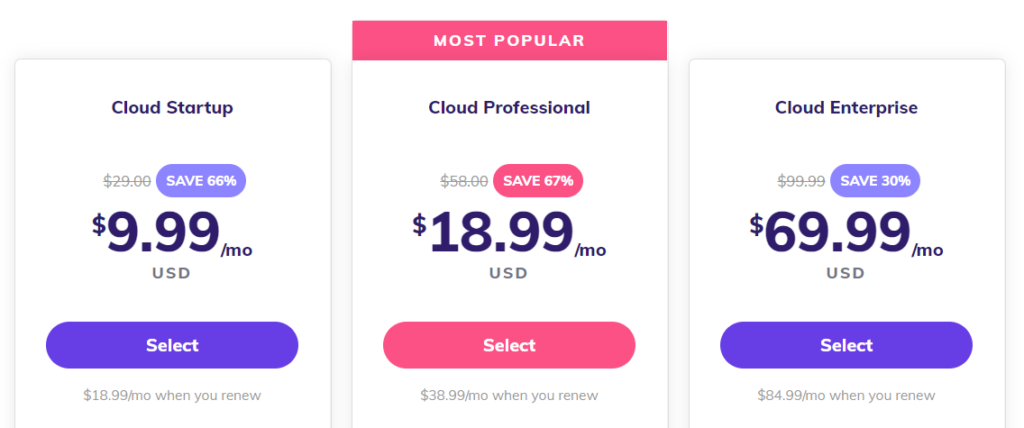
Pricing for Hostinger cloud hosting starts at $9.99 per month, though the monthly price will go up when you renew. This is completely standard in the hosting industry, but it’s something to be aware of.
What’s helpful about Hostinger pricing is that the longer you sign up, the cheaper it is to renew. You can lock in rock-bottom rates for up to 4 years and get a discount down the road.
HostGator offers even cheaper cloud web hosting than Hostinger–just know that HostGator isn’t giving you as much RAM, a dedicated IP, or automated daily backups.
When it comes to bang for your buck, nothing gets you as much for as little as Hostinger cloud hosting.
There’s a 30-day money back guarantee, so you can see if cloud hosting makes a difference for your business risk free. Get in touch with Hostinger to learn more.
Scala Hosting — Best for Custom Resource Allocation

- Fully customizable VPS resources
- Generous maximums on CPUs, RAM, & storage
- Affordable at scale
- Flexibility to adjust on the fly
Scala Hosting offers cloud VPS for customers, bringing the granular management of VPS together with the flexibility and scalability of cloud hosting.
But Scala truly rises above the pack in terms of its customization. They’re one of the only hosting providers out there that lets you set a precise, custom set of resources before you even sign up.
While they do offer pre-configured hosting plans starting at $14.95 per month, Scala allows you to create a bespoke hosting package with the perfect blend of memory, storage, and processing power to fit your specific needs.
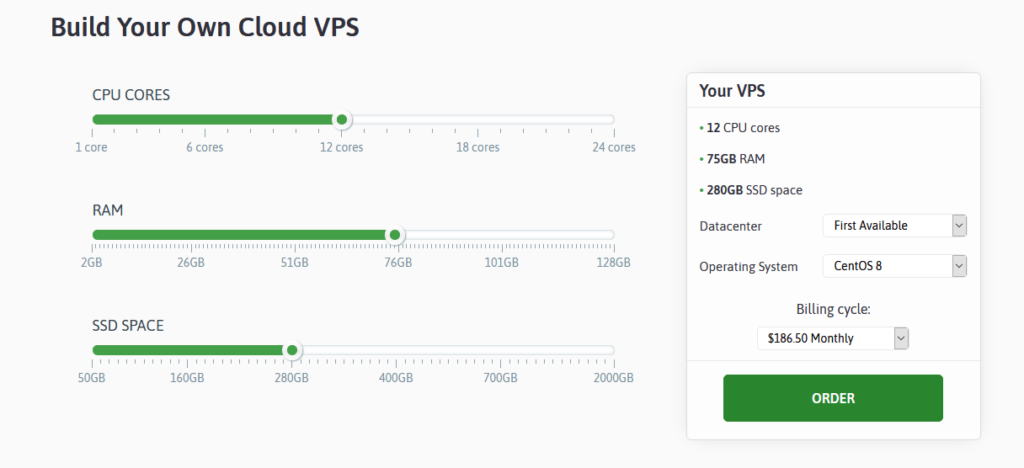
Best of all, it’s super easy to do this. Scroll down on Scala’s main cloud VPS page, and you can move the sliders for each up and down to your heart’s content. Minimums and maximums depend on whether you choose Scala’s managed or self-managed options.
Preset Scala managed cloud VPS plans:
- Start at $14.95/month for the Start Plan and go up to $152.95 for the Enterprise plan.
- CPU cores: Start provides 2 cores, Advanced gives 3, Business has 5, and Enterprise has 9 cores.
- RAM: Starts at 4GB and goes up to 18GB.
- SSD storage: Start has 50GB, Advanced has 80GB, Business has 160GB, and Enterprise has 320GB.
Scala self-managed cloud VPS is completely build-your-own and starts at:
- Starts at $59/month for 4 CPU cores, 8GB RAM, and 240GB SSD.
- CPU cores: minimum of four, maximum of 24, $6/month per each additional core
- RAM: minimum of 8 GB, maximum of 64 GB, $2/month per each additional GB
- SSD storage: minimum of 240 GB, maximum of 2 TB, $1/month per each additional 10 GB
There are also a bunch of additional add-ons you can purchase for self-managed cloud hosting, including LiteSpeed domains, WHMCS licenses, cPanel licenses, and more.
Either allows you a wide array of potential resource allocation options and Scala doesn’t really gouge you for adding more in any category. They don’t punish you for scaling to any extent.
You can also choose your preferred data center location, as well as your preferred control panel (on managed plans) or operating system (on self-managed plans).
So, Scala Hosting is an excellent option for anyone who knows exactly what they need from their hosting provider—especially if you know of a custom setup that would benefit your site but isn’t commonly offered by other providers (like if you just want blazing speed without a ton of storage space).
And pricing stays competitive despite all the customization you’re allowed. When you get up into the higher ranges of resources, Scala’s custom plans are more than competitive with top-of-the-line cloud hosting offerings from others—even outright beating them on both price and flexibility.
Get exactly what you need, scale freely, and reap the benefits of a precise combination of resources by going with Scala Hosting today.
Cloudways — Best Customizable Managed Cloud Hosting

- Seven data center options.
- Very fast managed hosting.
- Many CMS to choose from.
- Use coupon code QUICKSPROUT to get 25% off for 3 months
Cloudways sets itself apart from many other cloud-based web hosting services with its flexibility and customizable options along with lightning-fast speeds and 24/7/365 support.
In terms of options, you are unlikely to find a host with more of them. As a managed cloud host, Cloudways takes care of server management for you. When getting started, you select your CMS and can be ready to go in moments. Cloudways prides itself on simplicity with exceptional performance.
CMS options include:
- WordPress
- Magento
- Drupal
- Joomla
- Koken
- Media Wiki
- PHP Stack
- Prestashop
For plans and pricing, the rates depend on several factors, including selecting from seven data center options (and locations) and what level of RAM, processor cores, storage, and bandwidth you need. The data center options are:
- Linode
- DigitalOcean
- DigitalOcean Premium Droplets
- Vultr
- Vultr High Frequency
- AWS
- Google Cloud
The plans run the gamut of pricing. The least expensive is $10 per month including DigitalOcean standard hosting charges, with 1 GB of RAM, 1 core processor, 25 GB of storage, and 1 TB bandwidth.
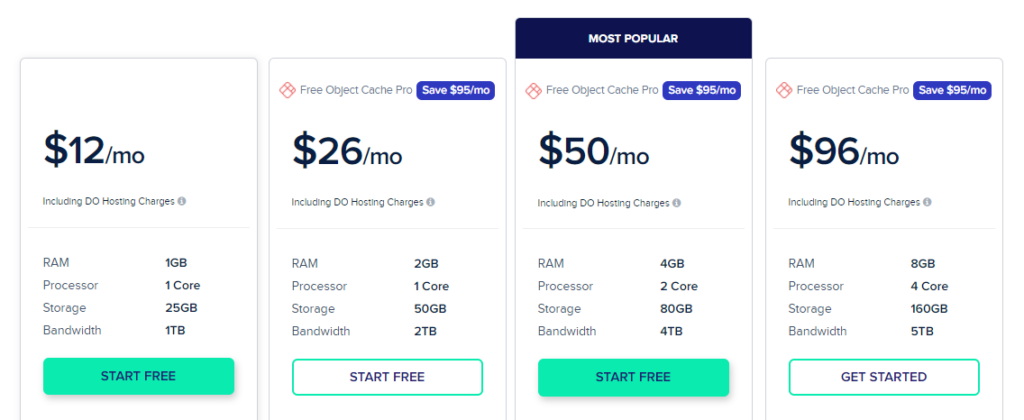
The most expensive is $274.33 per month including the AWS hosting charges. That plan includes 16 GB of RAM, 4 vCPU, 20 GB of storage, and 2 GB of bandwidth.
What is more impressive is the pay-as-you-go type of pricing. Cloudways offers some hourly packages that only actually charge you for any time you use, as opposed to paying for an entire month even if you cancel after 2 weeks. Of course, Cloudways also offers regular monthly plans, too.
All plans come with 24/7/365 support, free SSL, CDN add-on, free migration, unlimited application installation, 24/7 real-time monitoring, automated backups, advanced caches, auto healing, and more.
While Cloudways is not perfect — it lacks a cPanel and does not offer domain registration — it does offer a host of add-ons and integrations so it works for your needs. Add-ons include Rackspace email hosting Gmail SMTP, application migration, and more.
You can try Cloudways for free with a three-day free trial that does not require a credit card to get started. Use coupon code QUICKSPROUT to get 25% off for 3 months.
HostGator — Best Cheap Cloud Hosting

- Starts at $12.95/month
- $4.95/month if you pay annually
- Free domain and SSL certificate
- 45-day money back guarantee
HostGator offers some of the most cost-effective cloud hosting on the market today. They’re certainly the most affordable options on this list.
Let’s take a look at some the three basic cloud hosting plans offered by HostGator:
Hatchling Plan
- Starting at $4.95
- 2 CPUs
- 2 GB of memory
- Single domain
Baby Plan
- Starting at $6.57
- 4 CPUs
- 4 GB of memory
- Unlimited domains
Business Plan
- Starting at $9.95
- 6 CPUs
- 6 GB of memory
- Unlimited domains
These rates are for for 36-month contracts. They are 45% cheaper than the actual price, which you’ll end up paying when you renew your contract.
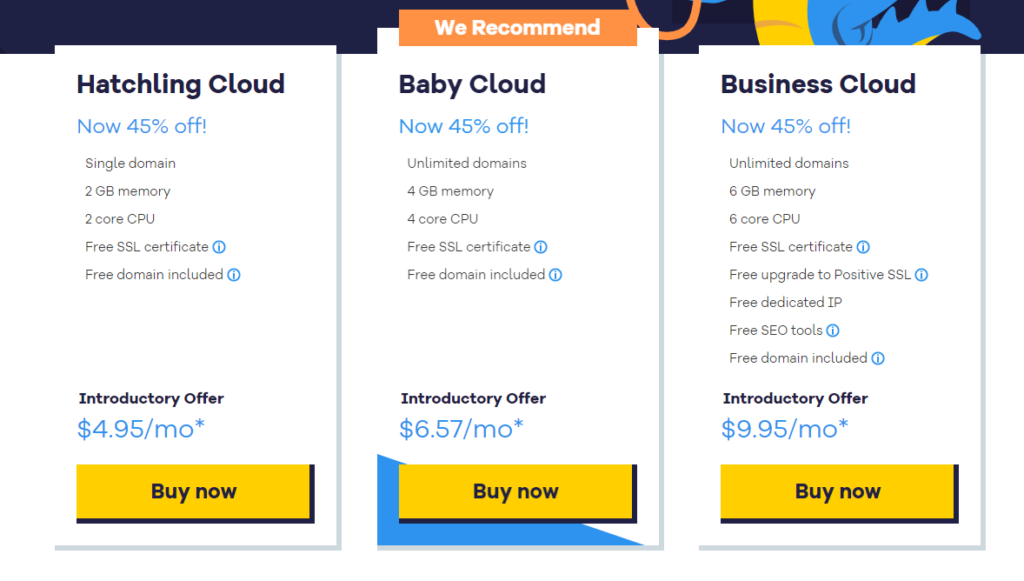
All HostGator cloud hosting plans come with a free SSL certificate. The Business plan comes with a dedicated IP, free SEO tools, and free domain as well.
Not only are they affordable, but they don’t sacrifice quality either. HostGator’s dashboard makes it easy for you to monitor the performance of your website. You can quickly view data related to page speed, uptime, reach, and more.
Scaling your server resources is simple as well. This can be done with just one click, without any downtime, reboots, or data migrations. Read more about their services in my full HostGator cloud hosting review.
Nexcess — Best for Ecommerce Sites

- Starts at $49.00/month
- Great for ecommerce sites
- 24/7 customer service
- Choose from 6 different plans
Nexcess is a web hosting solution brought to you by the good folks at Liquid Web. We’ve featured them before for their great hosting services, and Nexcess is no exception.
Their primary offerings are managed Magento, WooCommerce, and WordPress hosting (along with a few other CMS). That makes them perfect for ecommerce websites looking to grow.
But they also have a standout cloud hosting service too, that are great for scaling businesses. The specific plans vary depending on what your CMS is, they offer a wide variety of them.
That makes Nexcess perfect for growing businesses who plan to rapidly scale their growth—and are looking for a cloud host that will scale with them.
One tool I really like is Nexcess Cloud Accelerator. This is an additional layer in front of the cloud stack that boosts load times. That means your site will be nice and speedy for your customers.
They also have a dedicated support team on call 24/7 to help your business address any technical issues, or if you want to switch plans.
Here’s a look at the plans they offer:
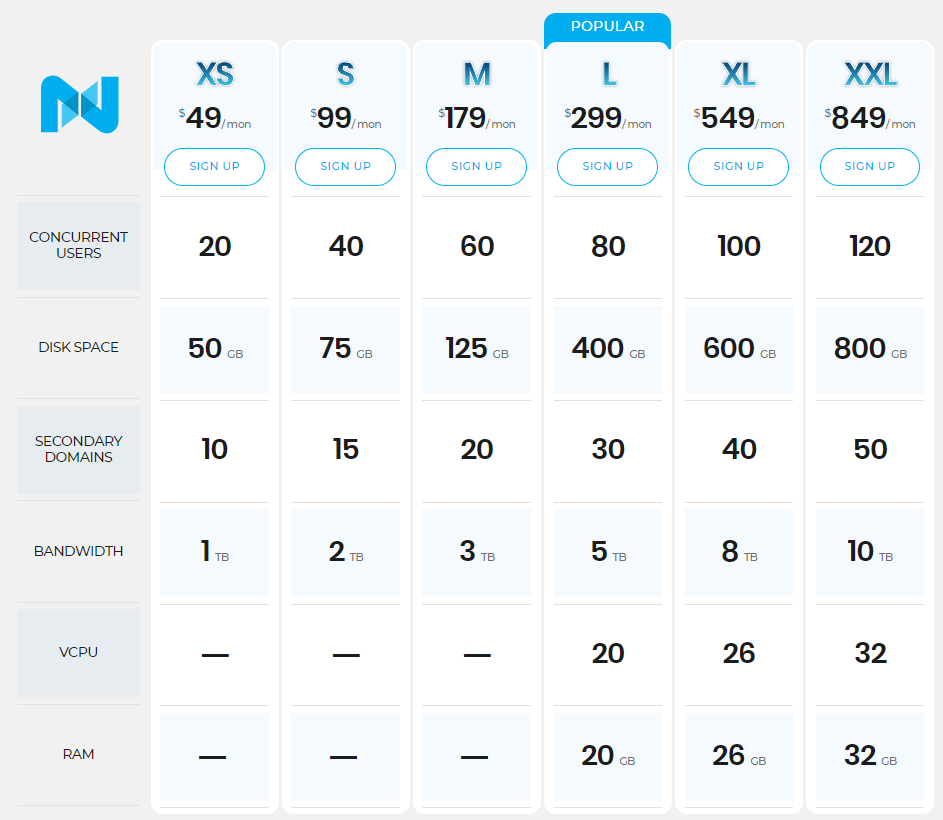
Everything is tuned for online business. You’ll be set up for taking payments securely and all customer info is kept secure.
Traffic spikes? No problem. Nexcess cloud hosting lets you scale up for a limited period of time if you need. You’re not going to locked into paying for more than you need to handle the busy hours.
You’re also not spending time making sure that your website is up. Nexcess manages everything on the backend so you can concentrate on selling.
Set up your store with Nexcess cloud hosting today.
DreamHost — Best for Developer Projects

- Starts at max $4.50/month
- 100 GB of block storage
- Free SSD & bandwidth
- Full root access & control
DreamHost has the easiest cloud setup in the industry. You can get your cloud servers live in less than 30 seconds. With that said, DreamHost cloud is best for developers.
They have server options that are made for databases, web apps, and running tests in addition to websites.
You can continue working the with DevOps tools that you’re already using. DreamHost also gives you full root access for complete control over your cloud servers.
The best part about DreamHost is that you only pay for what you actually use. You’ll get charged for resources on an hourly basis based on the size of your server.
- 512 MB of RAM Server — $0.0075 per hour (maximum $4.50 per month)
- 2 GB of RAM Server — $0.02 per hour (maximum $12 per month)
- 8 GB of RAM Server — $0.08 per hour (max $48 per month)
The 2 GB server is the recommended option for websites.
You will not be billed anything when you sign up. Instead, you’re billed based on your monthly usage.
The only area where DreamHost falls short that I found in my complete review of DreamHost web hosting services is their customer support. You can only contact customer service via email or live chat, which is only available for 16 hours daily. So if you prefer phone support or need help in the middle of the night, you’re out of luck until the morning.
SiteGround — Best for Scaling Resources

- Starts at $100.00/month
- Automatic scaling
- Daily & on-demand backups
- Priority support
SiteGround offers fully managed, high-performance cloud hosting built on Google cloud infrastructure. This means you’ll get auto-updates, tools to make managing websites easier, optimized servers, and a handy auto-scaling tool so your site stays running even with unexpected traffic spikes.
These plans are fully managed. That means they take care of your account for you.
SiteGround handles the IT of your hosting. This allows you to focus on other areas of your website. Plus, Siteground’s speed and performance are great. Every cloud hosting plan has the SG Optimizer plugin preinstalled and a unique PHP setup for extra speed boosts.
SiteGround cloud plans come equipped with an Automatic Scaling tool, preventing traffic loss and downtime. You can also add CPU and RAM at any time with one click in your admin settings.
With SiteGround, you can completely configure your own cloud and plan based on the resources you need. For example, they have six data centers on four continents to choose from, so you choose the one that is closest to your users. Here is a look at their plans:
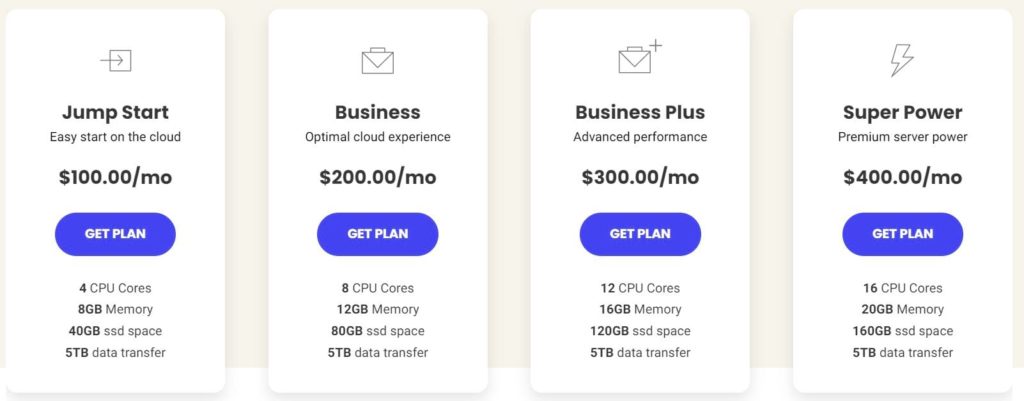
The Business or Business Plus plans should be more than enough resources for the majority of you, so that’s what I would recommend starting with. As your traffic rises, you can always scale as needed.
You’ll also benefit from webmaster tools like a dedicated IP, free CDN, free SSL, daily backups, and a private DNS. Check out my in-depth SiteGround web hosting review for more information about their overall services.
A2 Hosting — Fastest Cloud Web Hosting
- Starts at $5.00/month
- Up To 20X Faster Servers
- Managed & unmanaged options
- 30-day money back guarantee
A2 Hosting offers some of the fastest hosting services out there. Their cloud plans are no exception.
I like the A2 cloud options because the plans are fully customizable based on your needs.
Plans start at $5, $10, and $15 per month, respectively. But you only pay for the resources that you use based on how you configure your cloud servers.
If you want to have cPanel, it’s an extra $19.95 per month and not available with the lowest-tier pricing plan.
As I mention in my full review of A2 web hosting services they offer a 99.9% uptime promise as well as an anytime money-back guarantee. Although there are some contingencies to both, so make sure you read the fine print of your contract.
If customer support is important to you, then you’ll definitely be satisfied with A2’s 24/7/365 guru support team.
This cloud hosting provider is ideal for those of you who want unmanaged cloud hosting with lightning fast page loading speed.
InMotion — Best for Small Businesses

- Normally $64.99/month
- Free domain and SSL certificate
- Free launch assist service
- 90-day money back guarantee
InMotion offers some of the most understated cloud hosting services out there.
They have cloud hosting solutions for everyone.
- Small business cloud hosting
- Agency cloud hosting
- Application cloud hosting
- Enterprise cloud hosting plans
Altogether, InMotion has 10 different plans and pricing tiers for cloud hosting, which is the most I’ve seen offered by any provider.
For website owners, you’ll want to focus on the small business plans. InMotion makes it easy for you to scale your resources as your site grows I found in my complete review of InMotion hosting services.
You’ll also get a resource monitoring dashboard, free auto backups, rapid provisioning, and full snapshots of your servers. InMotion offers a free SSL and free cPanel license with all of its cloud business plans.
What Is Cloud Hosting?
Typically, your site is hosted on a single server. It could be your own dedicated server, or one that you share with other websites.
With cloud hosting, your web host isn’t connected to one physical location. Your website resources are maintained across multiple virtual servers in the cloud.
Each cloud server is responsible for specific sets of tasks. If one of the servers in the cloud fails or goes down, the others will automatically pick up the slack to provide those required resources.
Your website will continue to run smoothly with cloud hosting, even if there is a problem with one of the servers.
With cloud hosting your website benefits from increased uptime rates and won’t be as susceptible to unplanned downtime.
With a singe, physical server, you’re essentially putting all of your eggs in one basket. This is a huge risk when you’re dealing with something as important as your website.
In addition to eliminating the potential problems inherent with one server, cloud hosting will keep your site stable, even as your traffic increases.
Cloud hosting is also extremely easy to set up. For those of you who want to start hosting on the cloud right away, it can be a faster deployment option than something like a dedicated server or shared server.
Who Is Cloud Hosting For?
Cloud web hosting is ideal for medium to larger-sized businesses and websites that are growing rapidly. Cloud web hosting allows businesses to scale rapidly. That’s great for growing businesses.
Most cloud hosting plans have flexible pricing options, meaning you’ll only pay for the resources that you’re actually using.
If you’re anticipating random traffic surges or a steady increase in website traffic in the coming years, then cloud hosting is the perfect option for you.
However, cloud web hosting isn’t right for every business.
For those of you who have a small personal website, small blog, or a micro-business, you probably don’t need to use cloud hosting if there is no growth coming in the future. A shared hosting plan is fine for those types of websites.
When you’re ready to grow your website, you should consider upgrading to a cloud hosting plan as opposed to a VPS. While a virtual private server will be able to deliver enough server resources, a cloud plan is usually more cost-effective.
Enterprise-level websites with the need to customize their server settings would benefit from a dedicated hosting plan rather than a cloud solution.
Any website with more than 50,000 monthly visitors is a viable candidate for cloud hosting. It’s the perfect option for larger websites that can’t afford to have any downtime.
How to Find the Best Cloud Hosting Plan For You
Not every cloud hosting plan is the same. Some hosting providers offer different features and benefits compared to others.
When you’re evaluating a cloud web host, these are the factors that you should take into consideration.
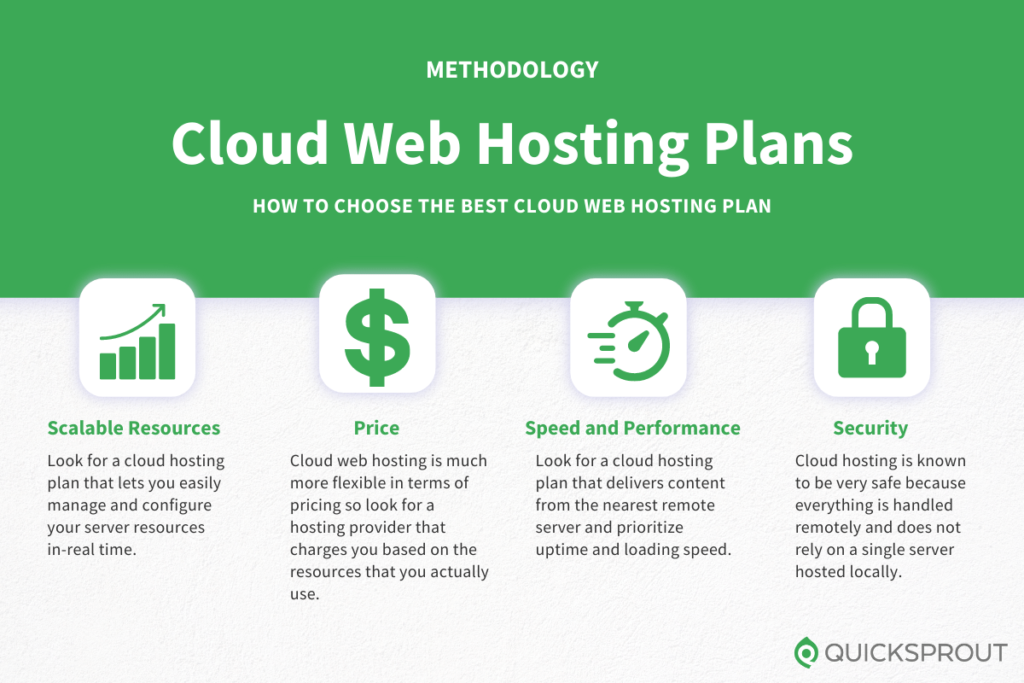
Scalable Resources
You need to make sure that you get a web hosting plan with enough bandwidth, storage, and disc space. To do this, you need to know how much traffic you’ll get. But new websites face a common dilemma when they’re looking for a hosting plan.
They have to decide if they want to get the highest possible bandwidth, even if they won’t come close to exceeding those limits. Or should they start with a lower bandwidth plan and upgrade as their traffic starts to increase?
Cloud hosting solves this dilemma.
Since your website is hosted on multiple servers, you won’t have to worry about exceeding bandwidth. If one server is maxed out, you can always pull resources from another.
Look for a cloud hosting plan that lets you easily manage and configure your server resources in-real time.
Here’s an example of what this looks like on HostGator Cloud, which is a provider that we reviewed earlier in this guide.
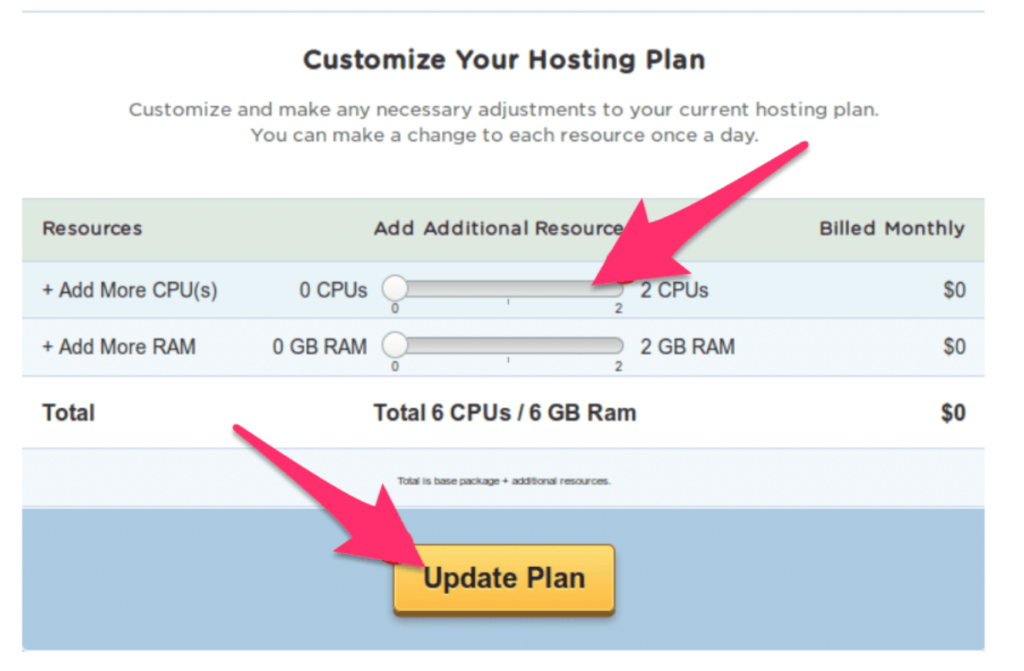
I’d recommend a cloud hosting plan that allows you to scale your server resources without needing any approval from the provider. This is something that can be managed from your admin dashboard.
Price
Most traditional hosting plans require you to pay a fixed monthly rate. You’ll be charged this amount even if you don’t use all of the resources on the server.
But cloud hosting is much more flexible in terms of pricing. So I’d look for a hosting provider that charges you based on the resources that you actually use.
Here’s an analogy. Let’s say you go to an all-you-can-eat buffet, where the food options can also be purchased à la carte. The buffet price is $20 per person, which is the most you’ll have to pay, regardless of how much food you eat.
But if you only eat $10 worth of food, then wouldn’t it be nice to get $10 back?
That’s how some of the best cloud hosting plans are structured.
This relates back to our previous point about being able to scale your resources on demand. For example, let’s say you just built a bunch of new backlinks and you’re expecting a particular blog post on your website to go viral.
Rather than upgrading your entire plan (which you’d have to do with other types of web hosting) you can just increase the resources needed during that traffic spike and put everything back to normal when your traffic levels out.
In this case, you’d only pay for the actual server usage during the surge. Here’s an example of this pricing structure from another one of the providers on our list, DreamHost.
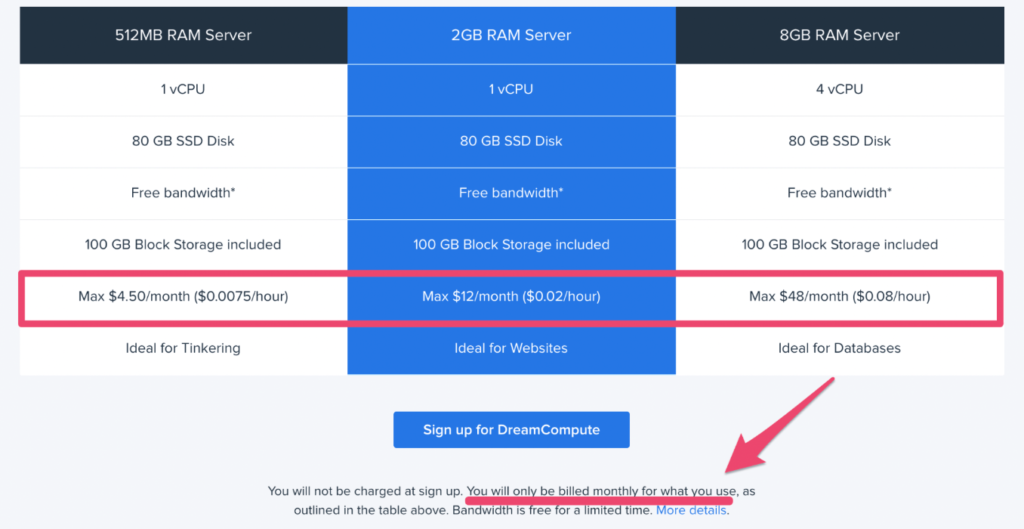
As you can see, pricing is based on usage. Each plan has a maximum monthly rate. Even the fine print at the bottom of the page states that you’ll only be billed for what you use.
So look for a hosting provider that offers a similar pricing structure.
Speed and Performance
If your hosting plan doesn’t deliver the best performance, then it’s a pretty crappy hosting plan.
The majority of cloud hosting servers will increase the capacity of your website, which boosts your page loading speed.
Cloud hosting doesn’t put as much strain on a singular server. If your website has lots of resource-intensive data such as videos, images, and other media content, then cloud hosting is something that you need to take advantage of.
Look for a cloud hosting plan that delivers content from the nearest remote server. This will ensure that all of your loading times are as fast as possible.
At the end of the day, your website visitors don’t care what type of hosting plan you’re using. They just want your site to be responsive and load quickly.
By prioritizing things like uptime and loading speed with cloud hosting, your website will ultimately perform better from the user end.
Security
No matter what type of web hosting plan you have, security always needs to be a priority.
Fortunately, cloud hosting is known to be very safe. That’s because your website is isolated from any potential problems with a physical server. Everything is being handled remotely, which wouldn’t be the case if you were relying on a singular server that’s hosted locally.
If a local server was compromised, then your website would be at risk. Whereas if one server in your cloud network was hacked, failed, or had a system overload, your website would stay up and running without any downtime or delays.
Look for a web host that offers any additional security protection as an incentive with your cloud hosting plan.
The Top Cloud Hosting Plans in Summary
Cloud web hosting is a great solution for growing websites. If your shared plan can no longer accommodate the needs of your site, then you should consider switching to a cloud solution since it can give you more resources, space, and performance power.
The majority of websites can benefit from cloud hosting. The increased flexibility, scalability, and resilience make it ideal for companies that need hosting resources on-demand. It’s a good choice for interactive sites, online stores, web apps, and IoT deployments.
from Quick Sprout https://ift.tt/0xkZNSW
via IFTTT